> ## Documentation Index
> Fetch the complete documentation index at: https://docs.altrina.com/llms.txt
> Use this file to discover all available pages before exploring further.
# Quickstart
> Run your first browser automation in 2 minutes
**Industry leading Web Agent**: Altrina is the **state-of-the-art browser agent**, beating OpenAI's CUA and Anthropic's Computer Use across benchmarks. [Details in our blog post →](https://www.altrina.com/blog/evolving-our-state-of-the-art-browsing-agent)
Now you have access too!
## 1. Get Your API Key
Sign up and get your API key at [app.altrina.com/settings](https://app.altrina.com/settings)
## 2. Run Your First Agent
```bash cURL theme={null}
curl -X POST "https://api.altrina.com/v1/run_browser_agent" \
-H "Authorization: Bearer YOUR_API_KEY" \
-H "Content-Type: application/json" \
-d '{
"directive": "Go to news.ycombinator.com and get the titles and points of the top 3 stories on the homepage"
}'
```
```python Python theme={null}
import requests
url = "https://api.altrina.com/v1/run_browser_agent"
headers = {"Authorization": "Bearer YOUR_API_KEY"}
directive = "Go to news.ycombinator.com and get the titles and points of the top 3 stories on the homepage"
response = requests.post(url, headers=headers, json={"directive": directive})
result = response.json()
print(f"Job ID: {result['job_id']}")
print(f"View on platform: {result['history_url']}")
```
```javascript JavaScript theme={null}
const response = await fetch(
'https://api.altrina.com/v1/run_browser_agent',
{
method: 'POST',
headers: {
'Authorization': 'Bearer YOUR_API_KEY',
'Content-Type': 'application/json'
},
body: JSON.stringify({
directive: 'Go to news.ycombinator.com and get the titles ' +
'and points of the top 3 stories on the homepage'
})
}
);
const result = await response.json();
console.log(`Job ID: ${result.job_id}`);
console.log(`View on platform: ${result.history_url}`);
```
## 3. Get Results
The agent typically runs for a few minutes. You have two options:
### Option 1: Watch on the Altrina Platform
Visit the `history_url` from step 2 to:
* **Watch live** - See the browser in real-time
* **View step details** - Review every action with screenshots
* **Take control** - Jump in anytime to guide the agent
### Option 2: Poll with the API
Check status and get results programmatically:
```bash cURL theme={null}
curl -H "Authorization: Bearer YOUR_API_KEY" \
"https://api.altrina.com/v1/get_job_status/{job_id}"
```
```python Python theme={null}
import time
# Poll until complete
while True:
response = requests.get(
f"https://api.altrina.com/v1/get_job_status/{result['job_id']}",
headers=headers
)
data = response.json()
if data['status'] == 'completed':
print(f"Output: {data['output']}")
break
elif data['status'] in ['failed', 'user_taken_over']:
print(f"Job ended with status: {data['status']}")
if data.get('error'):
print(f"Error: {data['error']}")
break
elif data['status'] == 'paused':
print("Job is paused")
# Continue polling or handle pause as needed
time.sleep(5)
```
```javascript JavaScript theme={null}
// Poll until complete
const checkStatus = async () => {
const response = await fetch(
`https://api.altrina.com/v1/get_job_status/${result.job_id}`,
{ headers: { 'Authorization': 'Bearer YOUR_API_KEY' } }
);
const data = await response.json();
if (data.status === 'completed') {
console.log('Output:', data.output);
} else if (['failed', 'user_taken_over'].includes(data.status)) {
console.log(`Job ended with status: ${data.status}`);
if (data.error) console.log('Error:', data.error);
} else if (data.status === 'paused') {
console.log('Job is paused');
setTimeout(checkStatus, 5000); // Continue polling
} else {
setTimeout(checkStatus, 5000);
}
};
checkStatus();
```
## Triggering Workflows via API
You can trigger any saved workflow by sending a POST request with your API key. No `user_id` is needed in the URL.
### 1. Trigger the Workflow
```bash cURL theme={null}
curl -X POST "https://api.altrina.com/workflows/run-with-payload/{workflow_id}" \
-H "Authorization: Bearer YOUR_API_KEY" \
-H "Content-Type: application/json" \
-d '{
"payload": "San Francisco"
}'
```
```python Python theme={null}
import requests
url = "https://api.altrina.com/workflows/run-with-payload/{workflow_id}"
headers = {"Authorization": "Bearer YOUR_API_KEY"}
response = requests.post(url, headers=headers, json={"payload": "San Francisco"})
result = response.json()
print(f"Job ID: {result['job_id']}")
```
```javascript JavaScript theme={null}
const response = await fetch(
'https://api.altrina.com/workflows/run-with-payload/{workflow_id}',
{
method: 'POST',
headers: {
'Authorization': 'Bearer YOUR_API_KEY',
'Content-Type': 'application/json'
},
body: JSON.stringify({ payload: 'San Francisco' })
}
);
const result = await response.json();
console.log(`Job ID: ${result.job_id}`);
```
Replace `{workflow_id}` with your workflow's ID — you can find it in the Studio URL (e.g. `app.altrina.com/gallery/studio/abc123-...`) or in the **Upon receiving a webhook** trigger modal, where it's pre-filled into the endpoint URL.
The `payload` field is optional. If your workflow has no input parameters, send an empty body `{}`.
When the workflow has input parameters, Altrina uses an LLM to map your free-form payload text into the declared parameters. For example, if the workflow expects a `City` parameter, sending `"San Francisco"` will set `City` to `"San Francisco"`.
### 2. Poll for Results
Use the returned `job_id` to poll for the workflow result:
```bash cURL theme={null}
curl -H "Authorization: Bearer YOUR_API_KEY" \
"https://api.altrina.com/v1/get_job_status/{job_id}"
```
```python Python theme={null}
import time
while True:
response = requests.get(
f"https://api.altrina.com/v1/get_job_status/{result['job_id']}",
headers=headers
)
data = response.json()
if data['status'] == 'completed':
print(f"Output: {data['output']}")
break
elif data['status'] in ['failed', 'canceled']:
print(f"Job ended: {data['status']}")
break
time.sleep(5)
```
You can also set up workflows to run on a **schedule** or via **email trigger** from the Studio UI. The API webhook is best when you need to trigger workflows from external systems like CI/CD, Zapier, or custom backends.
***
## Configuration Options
### VLM Models
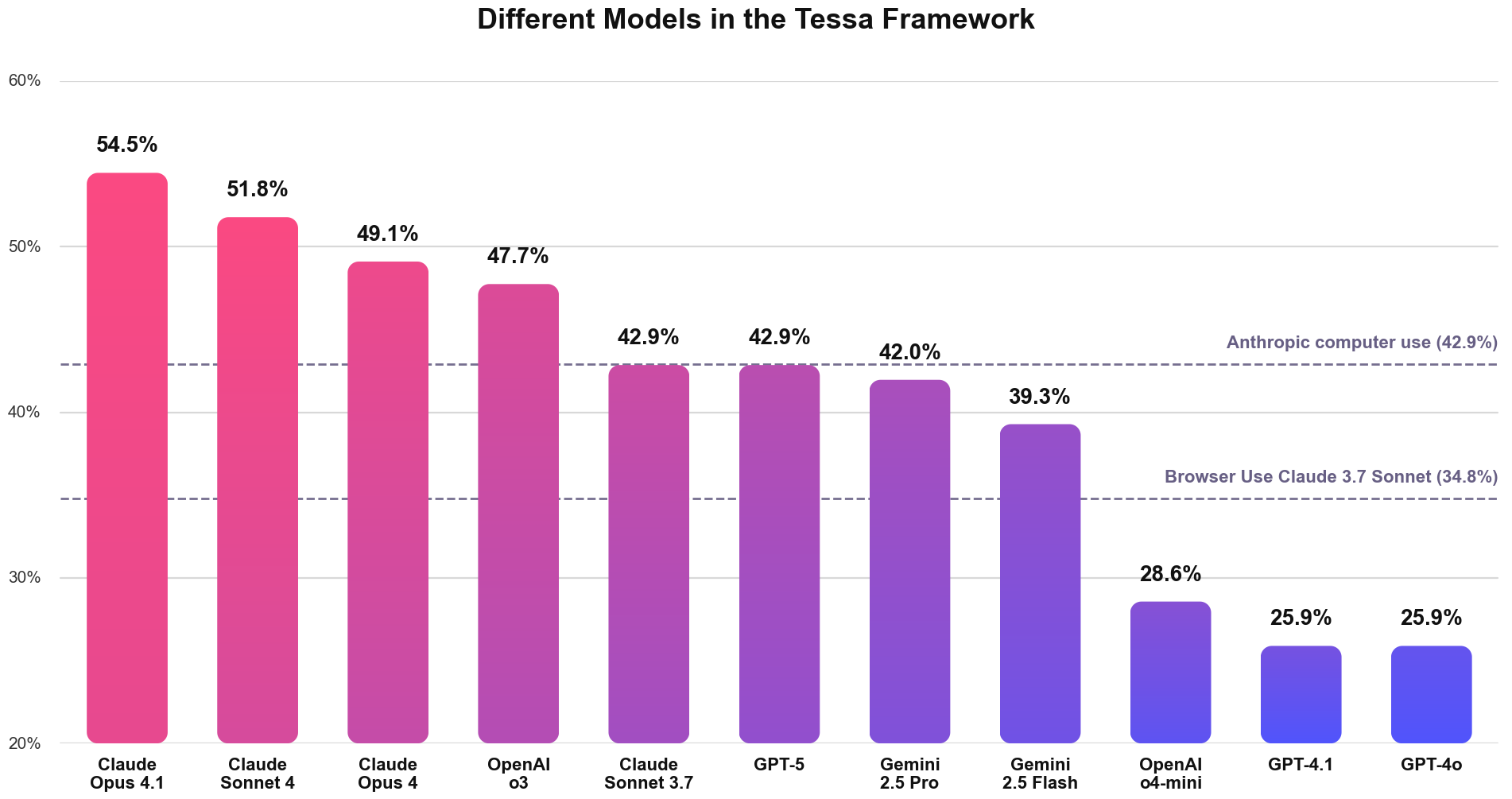
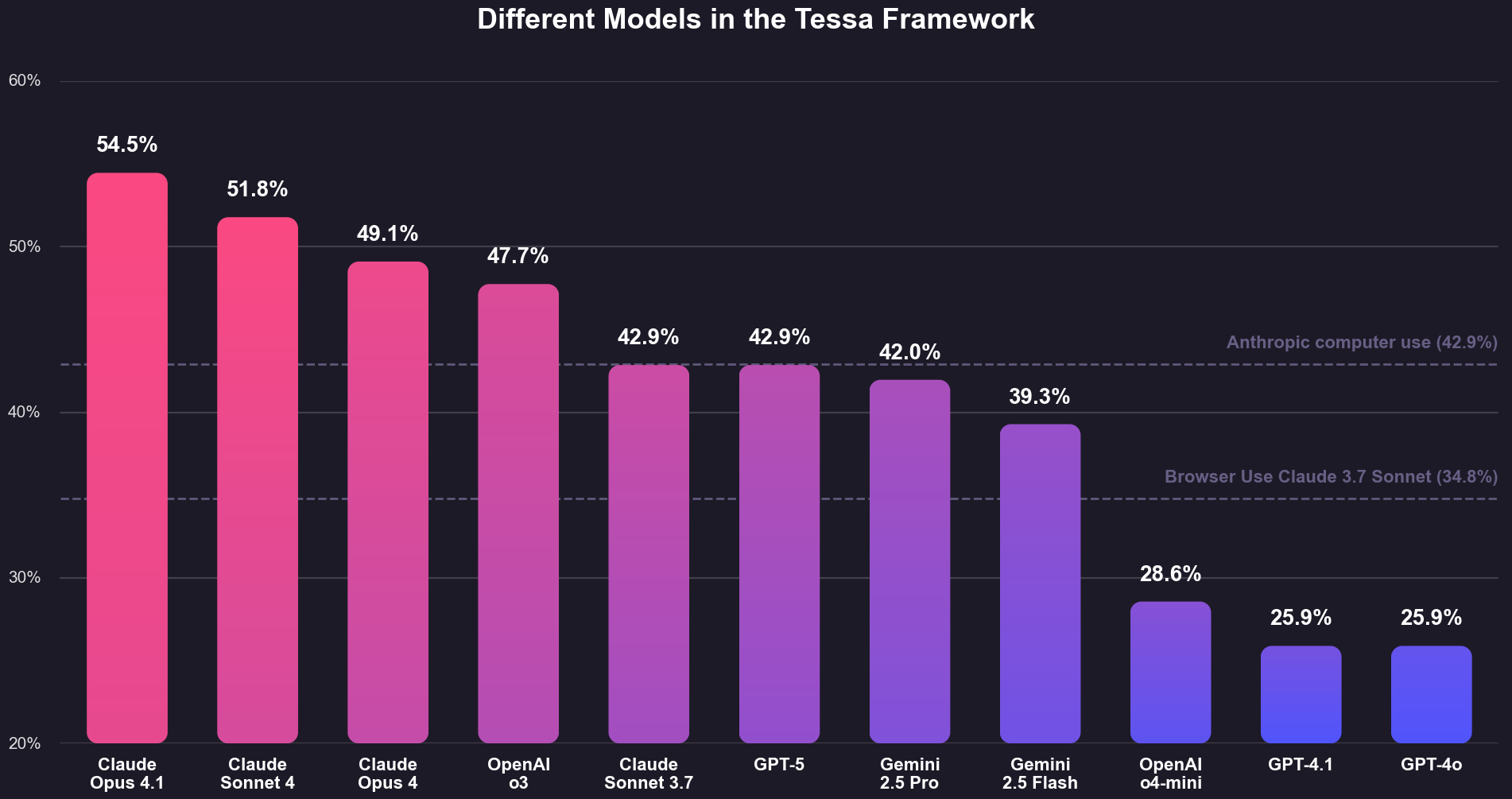 | Model | Credits/Step | Notes |
| ------------------------------- | ------------ | ----------------------------------------- |
| `gemini/gemini-3-flash-preview` | 1 | Fastest and cheapest option |
| `o3` | 3 | Good accuracy, cost-effective |
| `claude-sonnet-4-20250514` | 5 | **\[Default]** Recommended for most tasks |
| `gpt-4o` | 5 | Strong general-purpose model |
| `claude-opus-4-1-20250805` | 25 | Highest accuracy for complex tasks |
### Bring Your Own Browser (BYOB)
```json theme={null}
{
"directive": "Navigate to the dashboard and extract the monthly revenue",
"cdp_url": "ws://localhost:9222/devtools/browser/abc123"
// Connect to your Chrome browser anywhere
}
```
### Browser Settings
* **width/height**: Viewport size (320-4096px)
* **residential\_ip**: Residential proxy setting. `false` to disable, `true` for US proxy, or an ISO country code (`us`, `ca`, `gb`, `de`, `fr`, `au`, `jp`, `in`, `br`, `kr`)
* **max\_duration\_minutes**: Max runtime (1-240 min, default: 30)
* **idle\_timeout\_minutes**: Stop if idle (1-60 min, default: 2)
* **keep\_browser\_open**: Keep session alive after completion
* **use\_user\_browser\_profile**: Use persistent user profile (cookies, localStorage) instead of fresh profile per job (default: false)
These options are only used when Altrina spins up a new browser session (not BYOB).
## Pausing & Resuming Jobs
You can pause a running job and resume it later:
```bash Pause a Job theme={null}
curl -X POST "https://api.altrina.com/v1/pause_job/{job_id}" \
-H "Authorization: Bearer YOUR_API_KEY"
```
```bash Resume a Job theme={null}
curl -X POST "https://api.altrina.com/v1/resume_job/{job_id}" \
-H "Authorization: Bearer YOUR_API_KEY"
```
```python Python theme={null}
# Pause a running job
response = requests.post(
f"https://api.altrina.com/v1/pause_job/{job_id}",
headers={"Authorization": "Bearer YOUR_API_KEY"}
)
# Resume the job later
response = requests.post(
f"https://api.altrina.com/v1/resume_job/{job_id}",
headers={"Authorization": "Bearer YOUR_API_KEY"}
)
```
**Pause Timeout**: Paused jobs will automatically fail if not resumed within 6 hours.
## What's Next?
* **[Trigger Workflows](/api-reference/endpoint/run-workflow-with-payload)** - Run saved workflows via API
* **[Browse Endpoints](/api-reference/endpoint/run-browser-agent)** - Full OpenAPI documentation
* **Support** - [support@altrina.com](mailto:support@altrina.com)
## Tips
1. **Base URL**: Browser agent endpoints use `https://api.altrina.com/v1`, workflow endpoints use `https://api.altrina.com/workflows`
2. **Auth Header**: Include `Authorization: Bearer YOUR_API_KEY` in all requests
3. **Rate Limits**: 10 req/min for browser agent, 60 req/min for status/balance
4. **Watch Live**: Use the `live_url` to see your agent work in real-time
5. **Natural Language**: Write directives like you'd instruct a human
6. **Be Specific**: Clear instructions get better results
7. **Check Credits**: Monitor usage with `/v1/get_credit_balance`
***
| Model | Credits/Step | Notes |
| ------------------------------- | ------------ | ----------------------------------------- |
| `gemini/gemini-3-flash-preview` | 1 | Fastest and cheapest option |
| `o3` | 3 | Good accuracy, cost-effective |
| `claude-sonnet-4-20250514` | 5 | **\[Default]** Recommended for most tasks |
| `gpt-4o` | 5 | Strong general-purpose model |
| `claude-opus-4-1-20250805` | 25 | Highest accuracy for complex tasks |
### Bring Your Own Browser (BYOB)
```json theme={null}
{
"directive": "Navigate to the dashboard and extract the monthly revenue",
"cdp_url": "ws://localhost:9222/devtools/browser/abc123"
// Connect to your Chrome browser anywhere
}
```
### Browser Settings
* **width/height**: Viewport size (320-4096px)
* **residential\_ip**: Residential proxy setting. `false` to disable, `true` for US proxy, or an ISO country code (`us`, `ca`, `gb`, `de`, `fr`, `au`, `jp`, `in`, `br`, `kr`)
* **max\_duration\_minutes**: Max runtime (1-240 min, default: 30)
* **idle\_timeout\_minutes**: Stop if idle (1-60 min, default: 2)
* **keep\_browser\_open**: Keep session alive after completion
* **use\_user\_browser\_profile**: Use persistent user profile (cookies, localStorage) instead of fresh profile per job (default: false)
These options are only used when Altrina spins up a new browser session (not BYOB).
## Pausing & Resuming Jobs
You can pause a running job and resume it later:
```bash Pause a Job theme={null}
curl -X POST "https://api.altrina.com/v1/pause_job/{job_id}" \
-H "Authorization: Bearer YOUR_API_KEY"
```
```bash Resume a Job theme={null}
curl -X POST "https://api.altrina.com/v1/resume_job/{job_id}" \
-H "Authorization: Bearer YOUR_API_KEY"
```
```python Python theme={null}
# Pause a running job
response = requests.post(
f"https://api.altrina.com/v1/pause_job/{job_id}",
headers={"Authorization": "Bearer YOUR_API_KEY"}
)
# Resume the job later
response = requests.post(
f"https://api.altrina.com/v1/resume_job/{job_id}",
headers={"Authorization": "Bearer YOUR_API_KEY"}
)
```
**Pause Timeout**: Paused jobs will automatically fail if not resumed within 6 hours.
## What's Next?
* **[Trigger Workflows](/api-reference/endpoint/run-workflow-with-payload)** - Run saved workflows via API
* **[Browse Endpoints](/api-reference/endpoint/run-browser-agent)** - Full OpenAPI documentation
* **Support** - [support@altrina.com](mailto:support@altrina.com)
## Tips
1. **Base URL**: Browser agent endpoints use `https://api.altrina.com/v1`, workflow endpoints use `https://api.altrina.com/workflows`
2. **Auth Header**: Include `Authorization: Bearer YOUR_API_KEY` in all requests
3. **Rate Limits**: 10 req/min for browser agent, 60 req/min for status/balance
4. **Watch Live**: Use the `live_url` to see your agent work in real-time
5. **Natural Language**: Write directives like you'd instruct a human
6. **Be Specific**: Clear instructions get better results
7. **Check Credits**: Monitor usage with `/v1/get_credit_balance`
***
