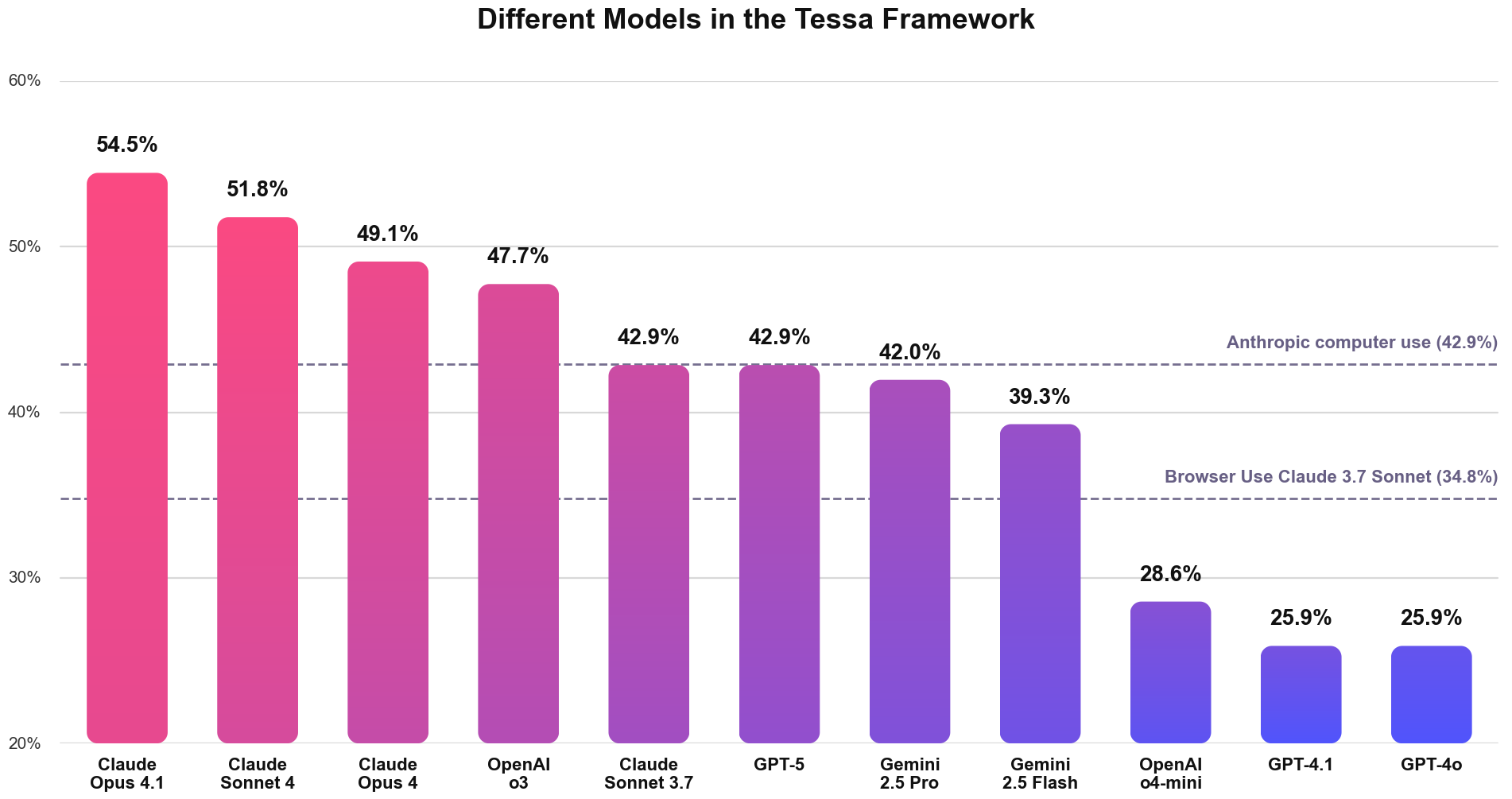
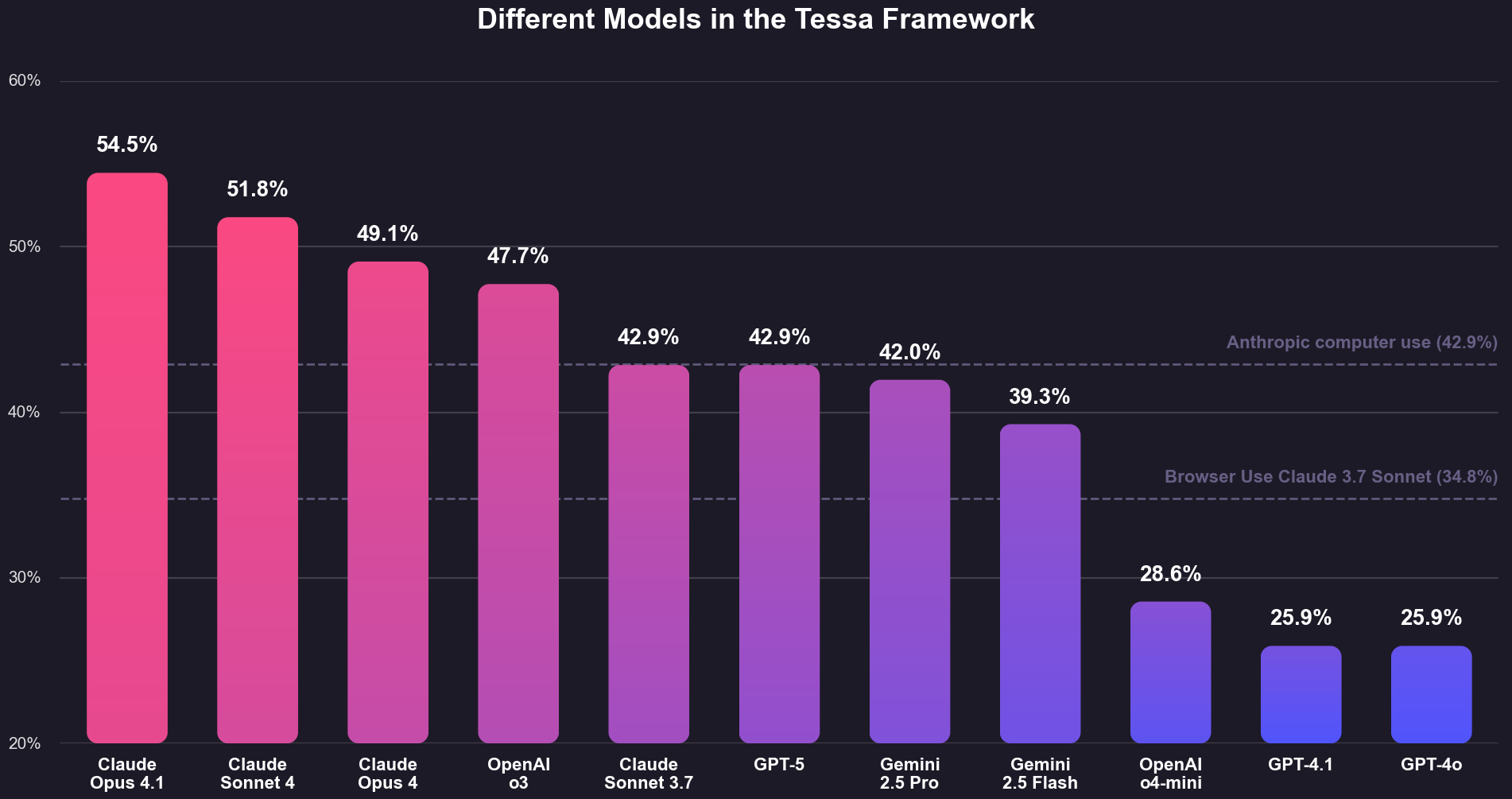
Industry leading Web Agent: Altrina is the state-of-the-art browser agent, beating OpenAI’s CUA and Anthropic’s Computer Use across benchmarks. Details in our blog post →Now you have access too!
curl -X POST "https://api.altrina.com/v1/run_browser_agent" \
  -H "Authorization: Bearer YOUR_API_KEY" \
  -H "Content-Type: application/json" \
  -d '{
    "directive": "Go to news.ycombinator.com and get the titles and points of the top 3 stories on the homepage"
  }'
import requestsurl = "https://api.altrina.com/v1/run_browser_agent"headers = {"Authorization": "Bearer YOUR_API_KEY"}directive = "Go to news.ycombinator.com and get the titles and points of the top 3 stories on the homepage"response = requests.post(url, headers=headers, json={"directive": directive})result = response.json()print(f"Job ID: {result['job_id']}")print(f"View on platform: {result['history_url']}")
const response = await fetch( 'https://api.altrina.com/v1/run_browser_agent', { method: 'POST', headers: { 'Authorization': 'Bearer YOUR_API_KEY', 'Content-Type': 'application/json' }, body: JSON.stringify({ directive: 'Go to news.ycombinator.com and get the titles ' + 'and points of the top 3 stories on the homepage' }) });const result = await response.json();console.log(`Job ID: ${result.job_id}`);console.log(`View on platform: ${result.history_url}`);
Replace {workflow_id} with your workflow’s ID — you can find it in the Studio URL (e.g. app.altrina.com/gallery/studio/abc123-...) or in the Upon receiving a webhook trigger modal, where it’s pre-filled into the endpoint URL.The payload field is optional. If your workflow has no input parameters, send an empty body {}.When the workflow has input parameters, Altrina uses an LLM to map your free-form payload text into the declared parameters. For example, if the workflow expects a City parameter, sending "San Francisco" will set City to "San Francisco".
import timewhile True: response = requests.get( f"https://api.altrina.com/v1/get_job_status/{result['job_id']}", headers=headers ) data = response.json() if data['status'] == 'completed': print(f"Output: {data['output']}") break elif data['status'] in ['failed', 'canceled']: print(f"Job ended: {data['status']}") break time.sleep(5)
You can also set up workflows to run on a schedule or via email trigger from the Studio UI. The API webhook is best when you need to trigger workflows from external systems like CI/CD, Zapier, or custom backends.
{ "directive": "Navigate to the dashboard and extract the monthly revenue", "cdp_url": "ws://localhost:9222/devtools/browser/abc123" // Connect to your Chrome browser anywhere}